 sidelook
A second pair of eyes,
on the subscription you already pay for.
Sidelook is a small Windows companion. Press Ctrl+Shift+Space, ask about the window you're in, or let it follow your clicks for ten minutes, turn a sketch into a working prototype, or let it work an app one approved click at a time. Any OpenAI model through ChatGPT, or Anthropic model through Claude. No API key.
Sidelook 0.18.0 · Windows 10/11 · unsigned exe with a published checksum · MIT source
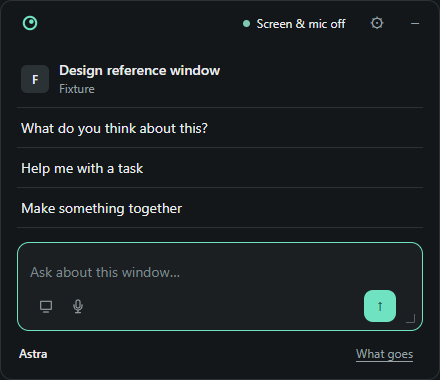
It stays out of the way
until you press the shortcut.
The companion is a dock in the corner. It doesn't listen, it doesn't watch your screen, and nothing opens on its own.
- Press Ctrl+Shift+Space.
A small panel opens beside whatever you're doing, no title bar, only as tall as what is in it. It grows as you talk and shrinks back to the dock when you close it.
- Press a question, or type one.
The window you were in is a tile at the top, with its app's icon; three questions written for it sit under it. "Unstick me" for an error, "What does this output mean?" for a terminal, "Draft a reply" for mail. Press the tile to pick the whole desktop or any open window, and the questions follow. A screenshot, or for errors, spreadsheets and settings the window's exact text, shows in the box before it goes. There is no tick; the button reads "Send with screenshot" or "Send with window text", and just an arrow when only words go. Ctrl+Shift+E does the first one in one press and stops at Send.
- Hand it something bigger.
Settings opens the studio beside the panel for a prototype. Computer mode is its own screen in the panel with a ten-minute permission and one approval per action. Both are explicit.
The builder:
keep drawing, watch it turn into a page.
Share a design window, describe what should work, and Sidelook builds it. You decide what gets sent and when it stops.
- Share a window, change the design.
- Pick the screen or window Sidelook can see. Live build sends a snapshot after you pause drawing, at least 30 seconds apart by default, ten builds per start. Camera, image upload and text-only builds work too.
- One instrument, not a page.
- A toolbar, the direction and reference panes down the left, the running prototype and Sidelook's reply in the middle, and the saved versions along the bottom. The seams run edge to edge and nothing but the prototype scrolls. F6 walks the panes, and below 900 pixels the studio folds into one column.
- Watch the code land as it streams.
- Unfinished HTML renders as it arrives. Open the code view, or flip back to the last working version. Draft scripts stay off until the finished result validates. The thinking time at the start is still there.
- Your model, your effort.
- Any OpenAI model through ChatGPT or Anthropic model through Claude, low through max effort. Low is the right place to start for small changes. OpenAI's CLI hands over finished messages; the incremental drafts are an Anthropic thing.
- Pause, cancel, go back.
- See the exact frame that was sent, pause automatic builds, stop sharing. Up to 12 versions stay in Sidelook's desktop profile. Restore one, read the source, download the HTML.
Computer mode:
one approved action at a time.
Runs in the Windows download only. This page can't inspect or control anything.
- Pick the app.
Start a ten-minute control session. Open Notepad, Calculator or Paint, or pick a supported window that's already open. Sidelook reads its accessible controls locally.
- Say what to do.
Choose a model and the effort. Allow a fresh reading of the window's accessible text, editable values included, to go to your model. No screenshot, no audio in this mode.
- Approve one action.
Check the target, the replacement text or the shortcut. Approve runs exactly one operation, Reject runs nothing. Plan the next step to see what happened. Each step uses your allowance, and Anthropic models can spend paid credits.
- Stop whenever.
Stop in Sidelook, untick the permission, or press Ctrl+Shift+F12 from any app. Approvals expire after a minute, sessions after ten, 20 model steps max. Stop doesn't undo what already ran.
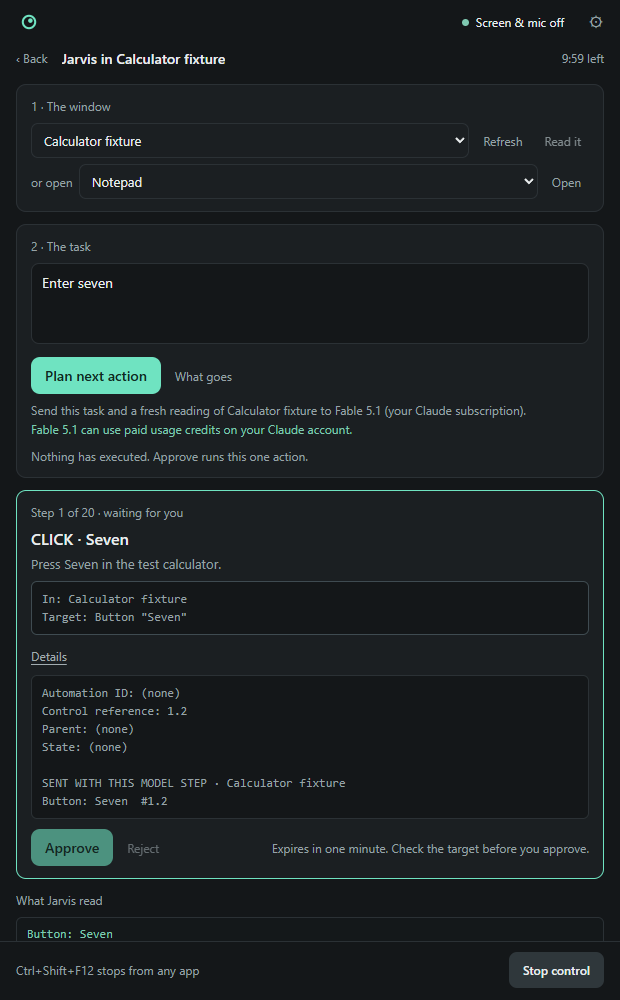
Accessible controls only. No canvas drawing, no coordinate clicking, no Explorer, no terminal or address bar, no shell tool, no admin prompts. Not every app exposes usable controls. A click or a key in the target app can send, delete or buy something, so read each approval. Read the Computer mode guide
From a design window
to a working prototype.
Four steps, each one captured from the studio itself. No screen is shared and no model runs on this page. This site does not generate anything.
Keep your design tool open beside Sidelook.
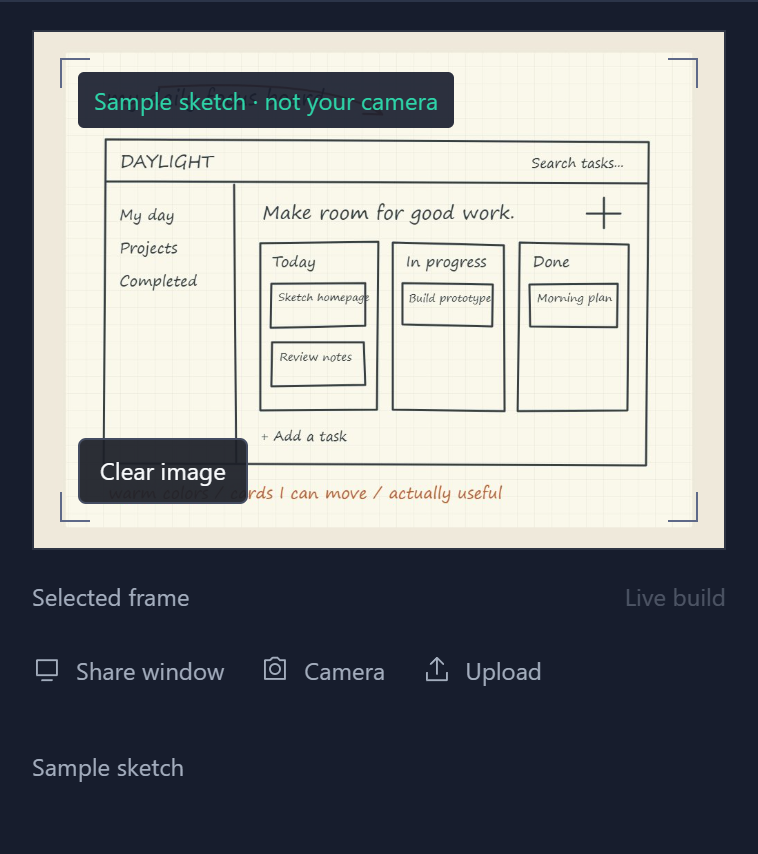
For one build, press Use this frame to put one still in the box; it shows as a chip, × removes it, and the button reads Build with frame. Sharing alone attaches nothing. For hands-off revisions, choose Live build and read the separate snapshot and usage notice.
A capture of the real pane, not a live screen picker. Sharing starts only inside the downloaded app. Camera, JPEG/PNG/WebP upload and typed directions also work.
Say what should work, not just how it should look.
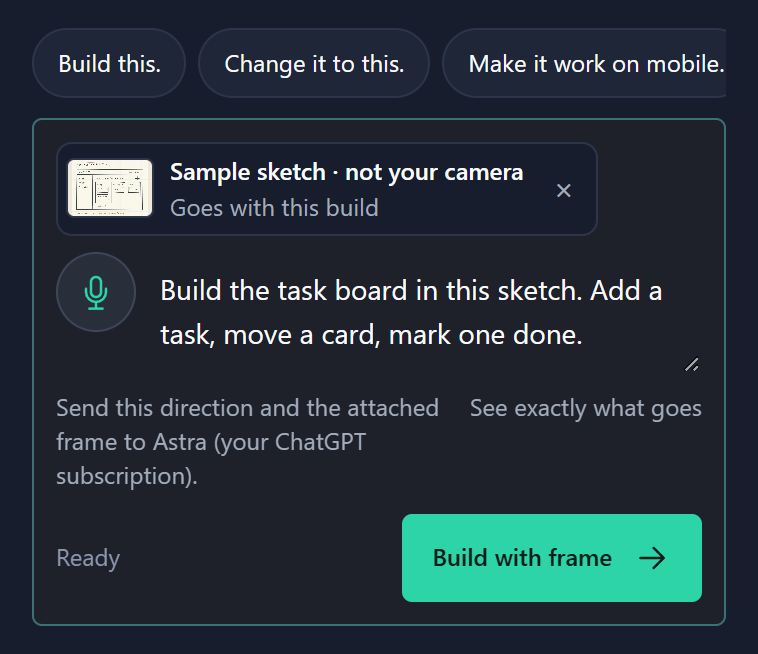
Pick your model and sign in through Settings, then type or dictate the direction. Low effort for a small change. The line under the box names what goes, including the selected version's source; Build sends it, or start Live build to pick up changes from the shared window.
Example direction, not a request sent by this page. Your provider receives the direction, the selected source and any included frame. Your plan's access and limits apply. Anthropic models can spend paid Claude credits.
With Fable, watch the draft take shape.
A status line and elapsed time show the build is running. When HTML starts arriving, the live draft updates and Code arriving lets you read it. Last working version is one click away the whole time.
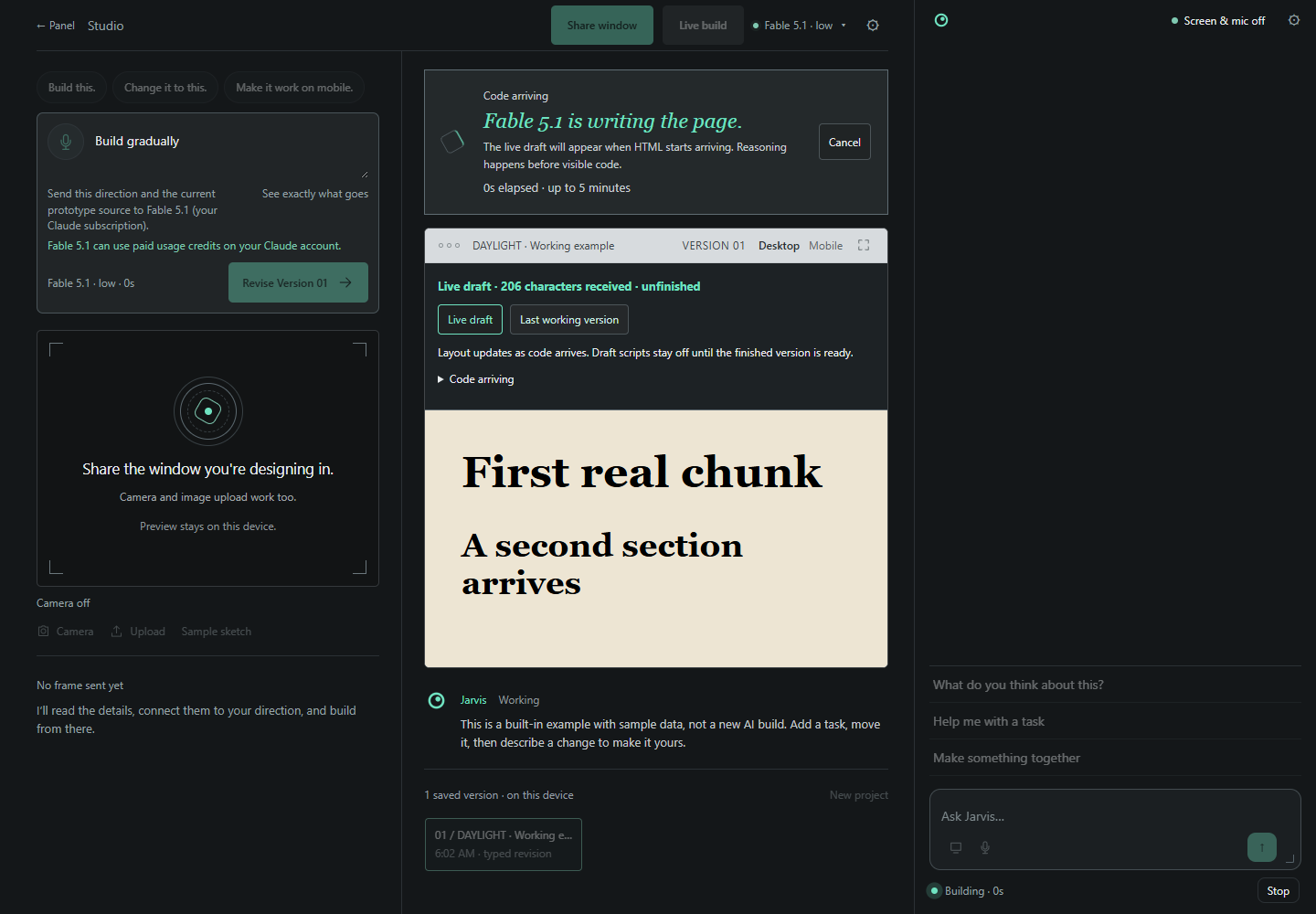
This still illustrates the draft stage, not a result of the example direction above. Thinking time comes first. Draft scripts are off until completion. OpenAI's CLI releases finished messages rather than incremental HTML.
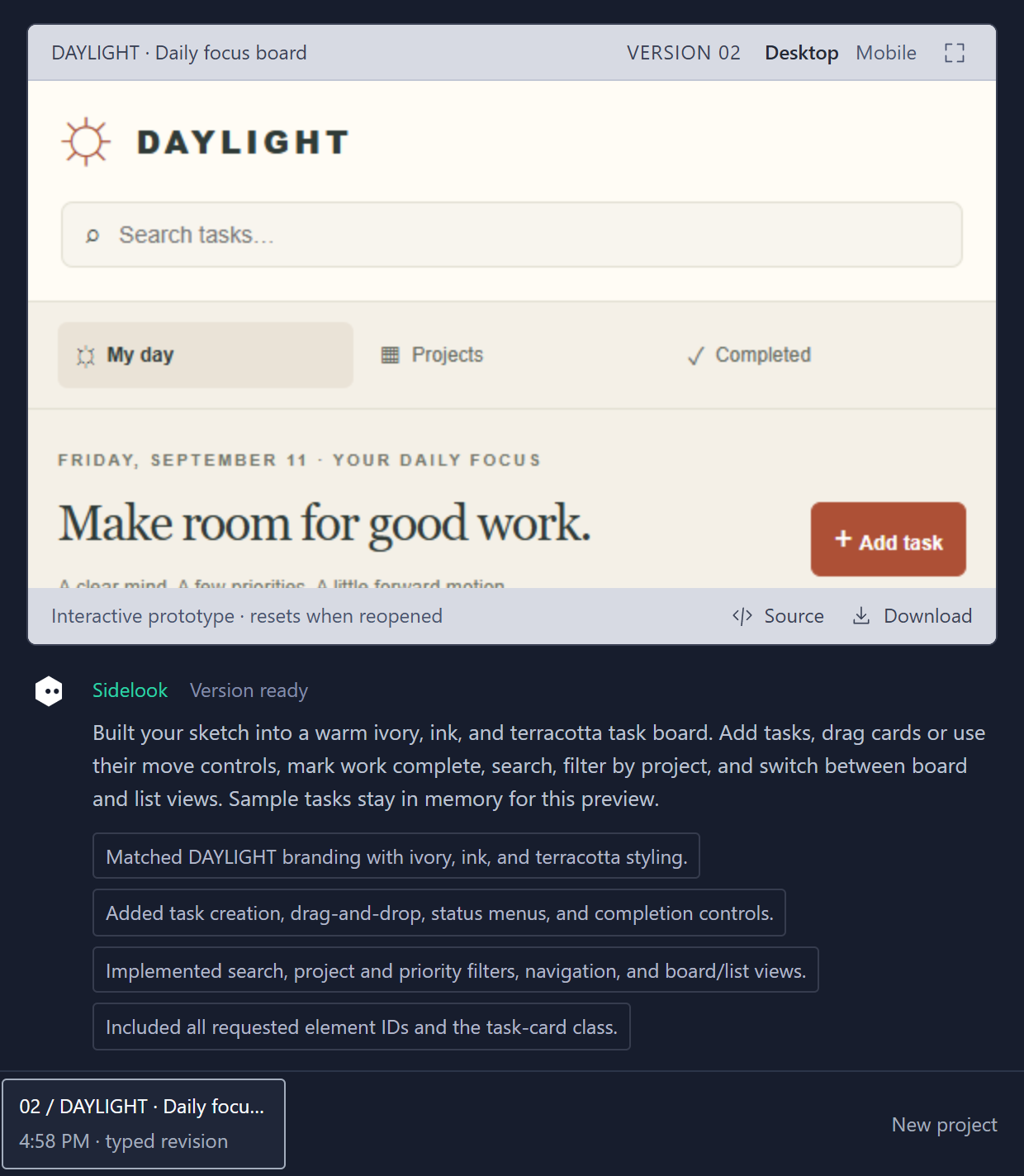
Change the design. Keep the versions.
- Automatic changes
- Live build waits for a real change and three quiet seconds. Minimum gap of 30 seconds, 60 seconds or two minutes. It pauses after ten builds per start.
- Your next version
- Try the finished controls, switch Desktop or Mobile preview, expand the work area. Ask for another change, or restore a saved version.
Source opens the finished HTML. Download saves one file with styles and interactions. Up to 12 versions and their reference images stay in Sidelook's desktop profile.
Pause cancels the in-flight request. Stop sharing also releases capture. Reload never restarts sharing. Reopening a version resets its runtime data. Downloaded HTML runs outside Sidelook's preview sandbox. This page does not perform a live revision.
Get Sidelook.
Generation runs on your machine, on your ChatGPT or Claude subscription, or on a local model in LM Studio or Ollama. Your plan's model access and limits apply. Anthropic models can spend paid Claude usage credits.
Download for WindowsSidelook 0.18.0 · Windows 10/11, 64-bit · needs the Microsoft Edge WebView2 Runtime
No terminal, no Node.js, no API key. MIT source.
The exe is unsigned, so Windows will show a publisher warning. Release notes and SHA-256 checksum
Check what you got against the published checksum: certutil -hashfile Sidelook-0.18.0-Windows-x64.exe SHA256 prints ea7e7d73496697bb50e650035178f667910c3e889ea79c348c9568f3185c7949. If Windows removes the download as a threat, that is a false positive on the unsigned launcher and not a compromise; the checksum is how you tell.
Run the download
Open Sidelook-0.18.0-Windows-x64.exe. It sets itself up in your user folder and opens the companion. No admin needed.
Ask about the next task
Ctrl+Shift+Space brings the panel forward with three questions for the window you were in. Press one, type, or dictate locally. The screenshot sits in the box so you can check it, and the Send button says it goes with the message.
Pick a model and a workflow
Any model in the catalog, low through max effort, or a local model that LM Studio or Ollama holds on your computer. Settings opens by itself until you sign in. Then press Bench in the panel header for the studio, or open Computer mode from Settings. Computer actions still need their own ten-minute permission and one approval each.
Come back any time
Use the Desktop or Start menu shortcut. The tray icon reopens the companion or lets you Quit Sidelook.
What leaves your machine,
and what doesn't.
What does this website collect?
The walkthrough runs in your browser. Vercel handles standard hosting request data and cookieless page-view analytics. This site never asks for your provider password or tokens.
What leaves my computer when I build?
The button says what goes, and What goes shows the request. Your prompt, any included frame, and the relevant previous source go through Codex to OpenAI or Claude Code to Anthropic, depending on the model you picked; with a local model in LM Studio or Ollama they stay on your computer. Camera sharing is explicit. Live build has its own consent for automatic snapshots, and the exact sent frame is there to review. No audio, no video stream. Credentials stay with the local CLI. Anthropic models can spend paid Claude credits.
Can I generate here without installing anything?
No. This website provides a prepared walkthrough. Real generation needs the local app and either a subscription with access to the model or a local model in LM Studio or Ollama. An account alone doesn't guarantee that access.
What if setup or generation fails?
Sign in, then use Check again in Settings. Sidelook shows missing access and usage limits plainly and never switches billing routes. Anthropic models show a live draft as HTML arrives, with scripts off until completion. OpenAI models release finished messages. Drop to low effort for smaller changes, and switch back to the last working version while you wait. Saved versions and source stay available when generation or preview fails.
Can I use voice, a camera, or an image instead?
Yes. Connect a camera, upload a JPEG, PNG or WebP, or build from typed directions alone. Windows local dictation turns your mic into editable text before you choose to build. Spoken replies use a local voice if you turn them on. Camera and dictation permissions are explicit, and desktop audio is never part of screen sharing.
What can I do with a finished prototype?
Use it in Desktop, Mobile or expanded preview. Read the Source, download the single HTML file, or restore one of up to 12 saved versions with its reference image. Settings, Advanced, Import a saved HTML prototype, brings in an exported file up to 120,000 bytes and adds a version when there's room. New project asks before clearing saved work. Browser profiles from a source install and older browser-based installs are separate. Runtime data inside a prototype resets when you reopen it. Retry preview reopens saved source without another model request.
Can it build a backend or control my desktop?
The builder makes frontend pages. Computer mode, enabled separately, drives accessible Windows controls with your approval before each action. No canvas drawing, no shell tool, no elevated access, no repo editing, no backend or deploy. Explorer, terminals, address bars and protected windows are excluded. The in-app preview blocks network access, nested frames, camera and microphone. Exported HTML runs outside that boundary.
Can I try anything before signing in?
The downloaded app has a working sample you can poke at without a model call or a login. Generating your own result needs subscription access or a local model. Settings offers install, sign-in, Check again and cancel. Start new allowance resets Sidelook's local counter only, not your provider's. Missing access and usage limits stop generation without switching models or billing.
Does this work on Mac or Linux?
The one-click launcher is Windows only. The source includes a Node.js server you can run elsewhere, but there's no Mac or Linux launcher in this download.
Who makes this?
Sidelook is a Practical Systems product, written by Wes. Karpathy's line fits it: "We're not building animals. We're building ghosts or spirits." Sidelook is summoned, looks at what you show it, and goes.